
Table of Contents
21 DQMH
Official DQMH Better Practices:
https://delacor.com/dqmh-documentation/dqmh-best-practices/
Nomenclature:
EHL = Event Handling Loop
MHL = Message Handling Loop
HL = Helper Loop
R&W4R = Request and Wait for Reply
Architecture
-
Embrace the “Queued Message Handler” architecture
-
Handling of incoming events is done in the EHL - the producer
-
Processing of messages and data is usually done in the MHL - the consumer
-
HLs can add additional producers and or consumers to a module (see below)
-
Code that takes long to execute needs to be implemented in the MHL, so that the EHL always stays responsive and is never blocked.
-
Simple code that executes quickly can be put into EHL to avoid unnecessary event/queue traffic
-
Some framework-level events (show panel, hide panel, shown diagram, get execution status, etc.) do this
-
Embrace .lvlib better practices
-
Keep all VIs belonging to a module inside its .lvlib
-
this avoids naming conflicts etc.
-
makes it easier to reuse code
-
makes it easier to understand architecture
Scan for loose VIs in same folder as lvlib-
Create an empty project and add the folder
-
Project structure should only show files inside lvlib and the tester(s)
-
Other VIs should be either added to library or deleted from disk.
TheMain.viis the only element on the root level of the module .lvlib. All other VIs and files reside in subfolders (see below)-
Manage shared dependencies (eg type definitions used by multiple modules) actively
-
Limit the number of shared dependencies as best possible
-
use native data types for arguments where possible (eliminates the need for type definitions for complex data)
Be very clear about which module is the owner of a dependency vs. which modules use it. Make sure the dependency “direction” aligns with your module architectureMove dependencies that are used by multiple modules equivalently to a separate shared reuse library to make the shared use explicit-
Cloneable modules share their event references: The first started clone instance creates them for all, and the last clone instance that stops destroys them
-
Do not use “Request and Wait for Reply” with module ID set to -1, as only one instance will actually respond (all the others will not be able to as the Notifier reference is closed with the first response). Instead, either send individual R&W4R's to each instance, or use a broadcast to collect responses from all instances.
Design
API
-
Make requests as atomic as possible and necessary (see Cohesion and Coupling)
-
eg create two separate requests “Connect” and “Start Reading” instead of a single “Open and Start”
-
If possible, use native datatypes for event payload data (request, reply and broadcast arguments)
-
instead of a typedef'd cluster, expose its elements
Data
-
Store data inside the MHL's data cluster on the shift registers, do not create FGVs for data internal to the module
-
Keep resources on a single Shift Register (SR) - ie not on multiple loops - if possible.
-
This is specifically important for references like VISA or TCP where parallel access is usually not supported.
-
The DQMH default is to keep data on the MHL SR.
-
If a HL needs to store Data create a new and seperate Data cluster and store it on the SH of the HL
Communication Event Types
DQMH provides three communication paradigms, each serving a different purpose. Choosing the appropriate one is important for creating responsive, loosely coupled modules.
-
Request: Use for asynchronous commands where no response is required.
-
The caller queues the request and immediately continues execution without waiting for the receiving module to process it.
-
Use this for “fire-and-forget” actions.
Request and Wait for Reply: Use for synchronous operations where the caller requires a result or must wait until the requested operation has completed.-
The caller blocks until a reply is received or the configured timeout expires.
-
The default request timeout of DQMH is set to 5 seconds, meaning a request will wait at most five seconds for a reply before returning a timeout error.
-
Use this for short-running operations where the result is immediately required.
Broadcast: Use for information that becomes available independently of a specific caller.-
Any interested module can register for the broadcast and will be notified whenever new data is published.
-
This is the preferred mechanism for status updates, progress information, measurements, and completed results that may have multiple consumers.
See also Timing below.
Timing
-
Do not increase the module timeout unless you have very strong reasons
-
If a requested operation may take longer than the default timeout of 5 seconds, or its execution time is unpredictable, do not simply increase the request timeout
-
Once a Request VI starts waiting for the reply, there is no way of cancelling at all.
-
Instead, redesign the communication to be asynchronous:
-
issue a Request to start the operation and
-
publish the result later using a Broadcast
This keeps the calling code responsive, avoids unnecessary blocking, and scales much better as applications grow.Events
-
Embrace event registration better practices (courtesy of D. Nattinger)
-
Make sure that a module's own Request events are always the first cluster wired to Register For Events
-
Then dependent modules should be wired after that
-
Then front panel/dynamic events wired after those
-
Any time you want to add something new, always add it at the bottom and leave the existing order unchanged
-
If you wire your Register For Events functions like this, you'll be less likely to see event structure order get messed up when adding new terminals.
-
Do not use Public API requests within the module to call MHL cases.
-
This creates unnecessary overhead when going through the EHL.
-
Instead, use the message queue to enqueue messages to MHL cases directly.
-
Private requests to Cloneable modules should always be “local instance” unless the architecture requires a shared event.
-
Usually we don't need shared events and can get rid of the “Addressed to me”-VI and lots of cases.
-
Be careful when using public requests to forward the module id to the private request. The id from the request can also have the “-1”, which can't be handled! Use the module id property node instead
-
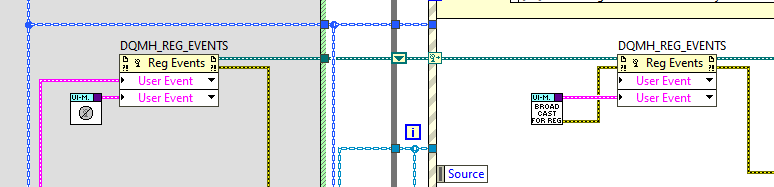
When registering for a module's broadcast events, use the
Null Broadcast Events–constant.vifor preparing the event data type when creating the event registration reference. Then use either theStart Module.vior theObtain Broadcast References for Registration.vifor actually registering the real, life references at runtime.
-
Use the HSE State Machine template for any state-related requirements
Wiring
-
Only wire data back into the module's data cluster if needed.
-
For drivers (mostly HAL), always bundle the wire back. Even if the parent or current implementation is reference-based, the HAL might evolve or receive further children in the future. Those other implementations might need the object to be written back to the SR.
-
In MHL, leave “Variant to data” and optional “Send Notification” on block diagram of main.vi, outside subVIs
-
separate DQMH code from module-specific code
Error Handling
-
Exclusive error range per module
-
See Error Handling for how to select ranges
-
See HSE Error Code Ranges for available ranges
-
For Requests with Reply, wire any error clusters only into the Reply payload and not back to the MHL error wire.
-
The requester is responsible for handling any errors in this case, not the module
-
If serving requests where “Reply?” is set to false regularly, consider wiring the error through the false case to the module (only in that scenario).
-
See also Error Handling
Sequencing
-
Do not create message chaining (ie add messages to other MHL cases from within an MHL case) to achieve a sequence of actions
-
These actions will not be atomic as there is no control over when other parts of the block diagram (eg the EHL or other helper loops) inject additional messages which potentially change the state of the module in between the originally enqueued actions
-
Create subVIs wrapping every single action, and then use these subVIs in very MHL case that requires that action
-
This results in atomic execution of a batch of actions
-
Use the HSE State Machine template for any advanced sequence of actions
Repetition
-
Do not self-message (ie send another message to the same MHL case to execute it repeatedly)
-
No parallelism with/to the MHL
-
You may get messages out of order if the MHL has to cater to other requests or messages
-
There’s a risk of flooding the queue with messages
-
Other cases of the MHL might starve
-
It’s more fragile if you need to start and stop the repetitive action (you might be tempted to use priority messages for the stopping, but that just leads to the need for flushing and is a slippery slope)
-
Timing and timeouts are tricky to handle correctly
-
Use a Helper Loop instead
Style
-
Remove the
#DQMH Code Recommendedcomments once the code has been added (or if no code is to be added)
-
DQMH modules have to have a coloured Icon badge so VIs are better discernable
-
see colors section in Coding Conventions
-
Broadcast VIs get a specific glyph on their icon to separate them from request VIs
-
see glyphs section in Coding Conventions
User Interfaces
-
If a module is designed to feature a user interface (i.e. if the front panel will be used by operators of the software) consider starting from the HSE State Machine template
-
Sooner or later there will be a requirement to disable or hide FP controls depending on the state
-
alternatively, add a “State” enum to the MHL data for a light version of a state machine
-
UI interaction should happen in the Message Handling Loop (MHL) to keep behavior centralized and easy to trace.
Where to place code
-
On Disk:
-
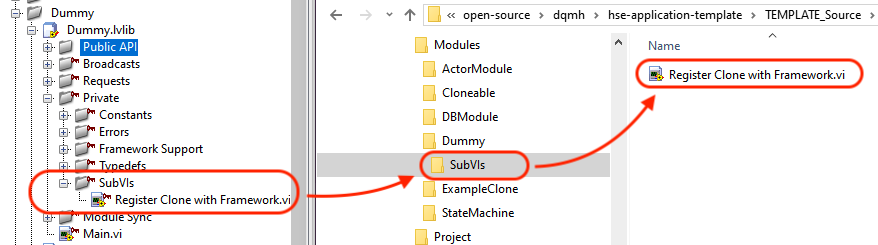
Put all manually created VIs into a
/SubVIsfolder and create further subfolders inside/SubVIs/as needed-
Helps separate scripted/generated VIs from self-created ones, especially when viewing changes in Source Code Control
-
In the .lvlib:
-
Add a
/Private/SubVIs/virtual folder for any files that don't fit the following. -
Place constants, errors and typedefs in the corresponding virtual subfolders in
/Private. -
Store any resources that need to be accessible from outside the module into virtual subfolders below the
/Public APIvirtual folder. -
If a Type-Def has to be public (e.g. because it's the return value of a Request with Replay), then place it in the virtual folder
Public API/Type Defs.
-
Pre version 7.0: Put private (VI-local) requests into a virtual folder called “Private API” and either “Request” or “Broadcast” virtual subfolder (similar to the “Public API” folder)
-
make the folder private
-
add a “private” key glyph to the request VI's icon
"Initialize" Case
-
Do not place any code before
Synchronize Caller Events.vi
-
For HSE, the “Initialize” case of a DQMH module's MHL is a framework function. We make a point of not adding any business logic to it. This is similar to an object's constructor never failing, thus guaranteeing a successful launch (quoting Dhakkan). Instead, we use a “Configure” case.
-
Every HSE module implements a “Configure” request which is triggered externally telling the module to go find and load its configuration, and potentially also do more, depending on the nature of the module.
-
In our HSE Application Template, that “Configure” request is executed automatically by the framework.
-
If the module needs to connect to hardware, a database, etc, we will implement a separate “Connect” request (ie that's neither part of the initialize nor of the configure case).
Outside MHL/EHL/HL
-
Be careful when adding code outside of the EHL/MHL/HLs, especially code that executes before the main Error Structure of the Main.vi and might delay running
Synchronize Caller Events.viinside the “Initialize” MHL case. If that code takes too long to execute, the module initialisation will time out and the Start Module.vi will throw error 403683 (“Module was unable to synchronise events”).
See Starting DQMH Modules - Implications for more details and background information on why placing code outside or before EHL/MHL/HL might lead to timeouts.
Parent/Child Modules
Parent describes a module starting another module, and Child denotes the module being started by the parent.
-
Make sure that if a module (parent) starts another module (child), it also takes care of stopping it again.
-
Ensure that for any module that's started, there is a place collecting status and error information from that module. Usually, the module starting another module (parent) registers for that other module's (child) broadcast events and handles or forwards at the very least the “Error Reported” broadcast accordingly.
-
Whenever possible, let a (parent) module start those (child) modules it depends on. This builds a dependency tree which
-
makes it easier to reuse code
-
makes it easier to understand architecture and inter-module communication
-
allows for simple testing from the module's API Tester
-
Start and stop your modules inside the MHL, EHL or HL, do not start them before entering the EHL or MHL.
-
prevents synchronization errors if starting the modules should take too long
-
gives you control over when exactly to start modules
-
lets you restart modules during runtime
-
conveys intent through the code itself
See Starting Child Modules for more details and variations of starting modules.
See Application Template Startup for how to design module coordination in the HSE Application Template.
Helper Loops
DQMH 7.0 introduces support for Helper Loop scripting, which makes the manual creation obsolete.
-
When coding a repetitive operation, use a helper loop that is registered to the
Stop Moduleevent and does the repetitive operation inside its timeout case.-
You can find a whole article about Helper Loops on our blog
-
If a Helper Loop has its own “Task” that is unrelated to the Message Handling Loop (MHL), all public requests can be directly addressed to the HL via scripting. However, if the HL and MHL are interrelated, and only part of the code is executed in the HL, public requests should go through the MHL. Within the MHL, a private request can then be made to call the HL. This approach helps to ensure readability.
See also our blog post on DQMH Actors.
Helper Loop Style
-
HLs need to have their enclosing while loop coloured
-
All Request VIs communicating exclusively with/to the HL need to have a ribbon in the same / similar color on their icon
-
If a HL must not be manipulated from outside the VI, make sure to only register Private Requests to the HL-
Obsolete with the advent of private/local events in DQMH v7

Message Pumps vs Active HLs
-
A “Message Pump” does not have any application logic, it only enqueues messages to the MHL, which then executes the actual use code
-
Any data is on the SR of the MHL
-
The HL is private (all public requests go to/through the MHL)
-
Drawback: Stopping is more complicated as the HL needs to stop enqueuing before closing resources
-
An “Active HL” contains the application logic and executes it directly, without involving the MHL
-
Some data needs to live on the SR of the HL
-
The HL is private (all public requests go to/through the MHL)
-
Drawback: More than one loop has data on a SR, synchronisation might be needed
-
How to choose one approach?
-
For simple modules (clear separation of configuration phase vs. running phase), it's ok to move resources to the Active HL
-
For more complex modules where resources need to be reconfigured or updated during acquisition, a message pump needs less synchronisation
The HSE Way of Working:
A set of guidelines that recommend programming style, better practices, and methods for all our LabVIEW projects. We ask all our peers to follow these guidelines to help improve the readability of our shared source code and make software maintenance easier.Contributors for this page: #teamhampelsoft, Darren Nattinger
-
kb/bestpractices/codingconventions/dqmh.txt · Last modified: 2026/08/17 16:06 by joerg.hampel
-
-
-
-
-
-
-
-
-
-
-
-
-
-
-
-
-
-
-
-
-
-
-
-
-
-
-
-
-
-
-
-
-
-
-
-

