
This is an old revision of the document!
Table of Contents
01 Overview
The HSE Error Code Helper Quick Drop Plugin tool integrates into the LabVIEW IDE and helps with managing and reusing (i.e. remembering) existing error codes as well as creating new error codes.
How it works
The plugin will bring up a dialogue window with a search field and a list of pre-defined error codes (see below). Codes are separated into several sections. The first section called “Library Errors” contains errors specific to the code module from which the tool was invoked. All following sections contain generic error definitions.

The user can search for errors by typing in numbers (error codes) or keywords (error descriptions). Pressing enter (or double-clicking an entry) will finish the selection process and close the dialogue.
What it does
Depending on the user action, there are three possible outcomes:
-
Selecting an existing generic code
-
Selecting an existing library-specific code
-
Entering a new code
The F3 key will center the QDUI window, always on the primary monitor.
Selecting an existing generic code
If the user selects an existing code from the list of generic codes, the tool will create an error cluster constant with the code and source as selected and place the object on the cursor to drop.
If an error constant or error control was selected on the BD before invoking the QD, the tool will update it with the selected code instead of creating a new constant.
Selecting an existing library-specific code
If the user selects an existing code from the library or class, the tool will select the corresponding constant VI and place the object on the cursor to drop.
Entering a new code
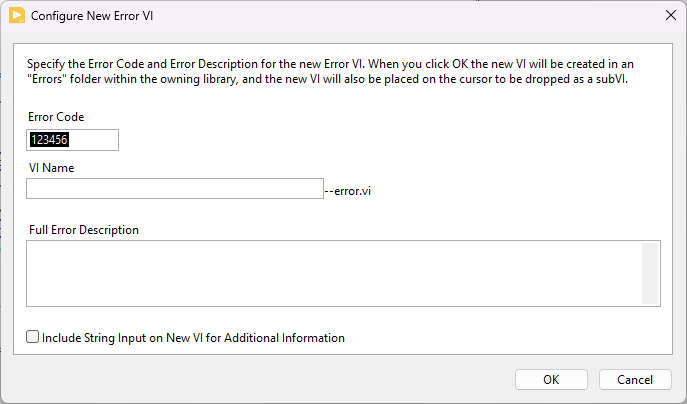
If the user does not select a code but types in a new code (integer) into the search field, the tool will create a new error constant VI and place it into the lvlib/lvclass containing the VI from which the QD was invoked.
To add a new code open the QD plugin and press enter, without a code. This will open an additional window and query the user for the error source string and if the newly created constant VI should have a string input for additional information. Eventually, it will place the new VI on the cursor to drop.
Error Code Definitions
The tool shows error codes from two different sources:
-
Any error constant VIs found in the lvlib/lvclass that hosts the VI from which the QD was invoked
-
Any generic error codes defined in the
<LabVIEW>/project/errorsdirectory
Error Constant VIs
The tool will parse the lvlib/lvclass that hosts the VI from which the QD was invoked and find all VIs which file name ends in “–error.vi”. For these VIs, the tool is able to extract the error code definition from error rings, error cluster constants or inputs wired to the 'Error Cluster From Error Code.vi'.
Error XML Files
Generic error code definitions are stored in NI's error XML format and installed into the <LabVIEW>/project/errors directory. The plugin will parse all XML files named *-errors.txt and show contents in alphabetical order.
Learn more about the HSE Error Code Definitions.