Table of Contents
10 IDE Setup
Personalizing a fresh install of LabVIEW and/or aligning your settings with those of your team mates goes a long way towards easier collaboration.
LabVIEW
LabVIEW.ini settings
Where Does LabVIEW Store Configuration Settings?
LabVIEW Wiki: LabVIEW Configuration File
QuickBold=True
bookmarkmanager.showvilib=True
bookmarkmanager.showresource=True
defaultErrorHandlingForNewVIs=False
sourceOnlyDefaultForNewVIs=True
QuickDropFastSearch=True
FancyFPTerms=False
reqdTermsByDefault=True
returnKeyAction=True
enableAutoWire=False
autoRouteWires=False
StructuresAutoSizeByDefault=False
DropSubdiagramLabelByDefault=True
allowItemsViewDelete=True
DefaultLabelPositionIndBD=4
DefaultLabelPositionBD=12
defaultControlStyle=2
useNumbersForNewVIIcons=False
autoInsertFeedbackNode=False
autoLayoutBlockPaddingX=25
autoLayoutBlockPaddingY=30
autoLayoutWirePaddingX=10
autoLayoutWirePaddingY=10
autoLayoutFixControls=True
autoLayoutFixIndicators=True
skipNavigatorDialog=False
server.tcp.access="+127.0.0.1;+localhost;+*"
showBDConstName=True
LVdebugKeys=True
DragAdjustWires=False
NI.LV.RemoveNoError=True
server.viscripting.showScriptingOperationsInEditor=True
More to be found at The LabVIEW Lab.
Other LabVIEW Settings
-
Change default names for accessors from “Read” & “Write” to “Get” & “Set”
-
Original location:
[LabVIEW20xx]\resource\Framework\Providers\LVClassLibrary\CLSUIP_LocalizedStrings.vi -
LV2025Q3 and later:
[LabVIEW20xx]\resource\Framework\Providers\LVClassLibrary\NewAccessors\CLSUIP_LocalizedStrings.vi
VI Packages
-
HSE WoW: Glyphs and Icon Templates
-
HSE WoW: LabVIEW Settings
-
HSE WoW: QuickDrop Plugins
-
HSE WoW: Timing Probe
-
HSE WoW: VI Analyzer TEsts
-
HSE WoW: VI Templates
-
Right Click Plugin Bugfix (removed since LV2020)
-
ZAlign (removed since LV2020)
VI Icons and Glyphs
Quick Drop Plugins
CTRL-Key Shortcuts
These QD plugins are installed via our WoW:
Shortcut Plugin Name S Align Elements (matrixx5687) A Align to Connector Pane (RoboticsME) G Create VI Template (dnatt) I Insert from Clipboard (hooovahh) J JSON to Cluster - QD (Fred_V) H Nattify_HSE_Flavour (dnatt) P Replace from Clipboard (DanyAllard) F Show VI in Win Explorer (David_L) These QD plugins are distributed with LV or via installed VI packages:
Shortcut Plugin Name Q Add Labels (Martin Nöhrer) M Bookmark QD Plugin (Greylock Tech.) X HSE Error Code Helper L HSE State-Machine Parser E Launch DQMH Tool T Move Labels R Remove and rewire O Reset to Origin U Run Project Unit Tests (Caraya) K Set Text Icon B VI Server Rename D Wire All Terminals W Wire Multiple Objects Together Block Diagram (inserts)
Text Object to insert hiHSE Logger INFO VI hdHSE Logger DEBUG VI hwHSE Logger WARNING VI heHSE Logger ERROR VI htHSE Caraya Unit Test Template Custom Probes
Creating Custom Probes
LavaG Custom Probes Repository-
Further useful probes are included in the VI-Packes JSONText and SQLite from J. Powell.
VI Templates
VI Analyzer Tests
We can install custom VI Analyzer tests.
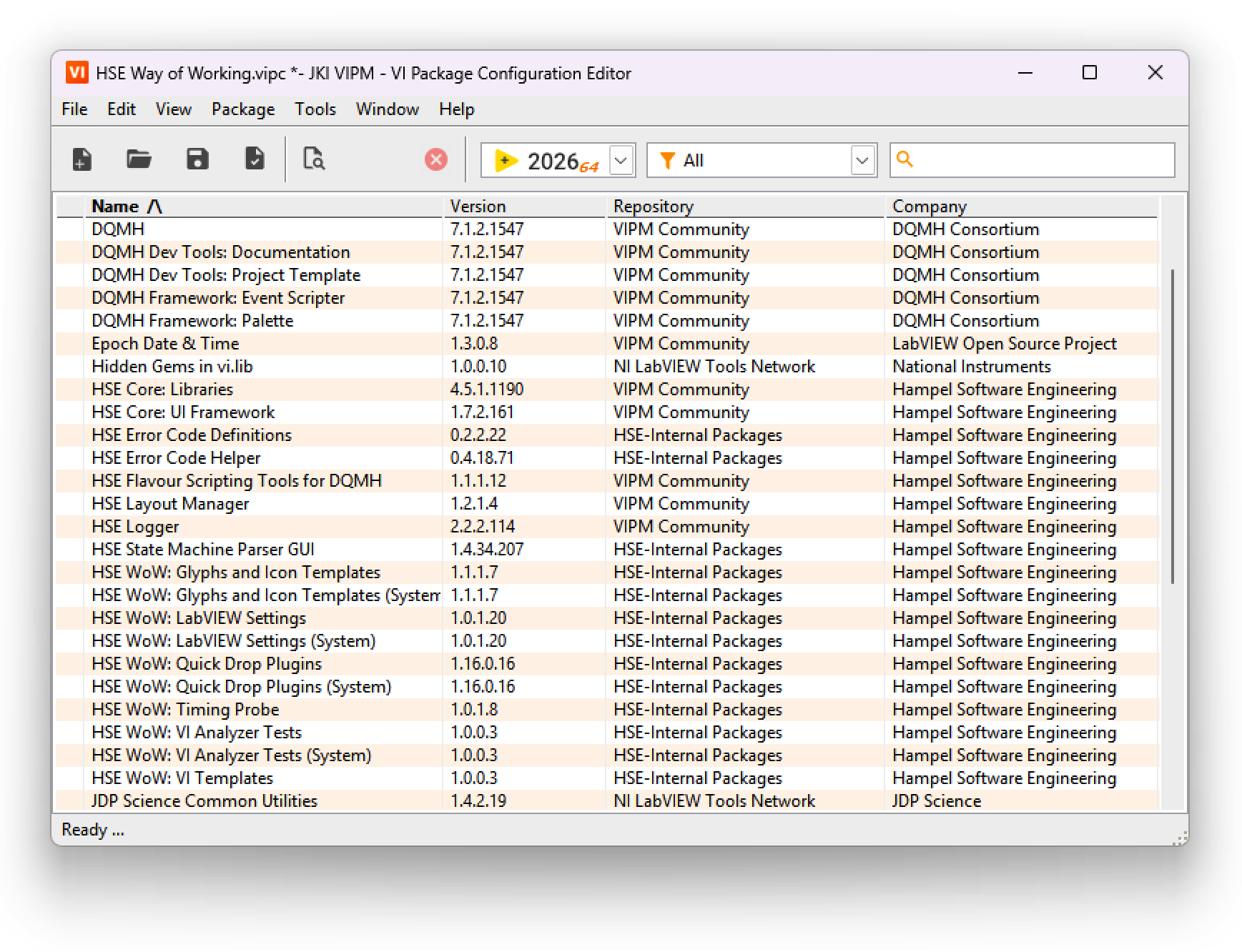
HSE WoW .vipc
We've created a .vipc (a VI Package Configuration file) that automates all of the above for ourselves and for our customers:
Please feel free to contact us if you are interested in a customized WoW VI Package for your team.
Other Resources
These are items that are not part of our WoW .vipc.
Shortcut Menu Plugins
Git Setup
see our page about Fork Setup and SSH Setup. When working on multiple (virtual) machines, the easiest way is, to maintain only one pair of ssh-keys. Keep the default name and store them in a central, but safe place and distribute it to all machines and SCCM providers.
-