Table of Contents
02 Broadcasts
These events are not part of the DQMH default features and have to be added to every HSE DQMH module.
'Module Is Ready'
Use theModule Is Readybroadcast to indicate that a module is ready to be used in the application
 |
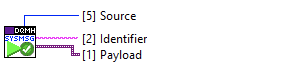
'System Message'
Sends a HSE-generic broadcast message, consisting of an Identifier, a variant Payload and Source information.
-
Provides a generic way of broadcasting information
-
Allows for dynamic registering and triggering of broadcast events

-
string
Identifier -
variant
Payload -
enum
Source Type(module, application, network)-
the typedef can be found in
hse-libraries/hse-dqmh.lvlib/Templates and Controls/System Message Source.ctl
stringSource Name(Module Name)-
for clones, the Clone ID is appended to the Module Name
Singleton

Cloneable

Message Types
Ready for Display
Lets the UI Manager know that a module identified by <b>Main VI Reference</b> wants to be displayed in the content subpanel.
Optional: “Title” specifies the string to be displayed in the Title indicator of Layout VI
Optional: “Target SP Name” defines the subpanel in which to display the module.
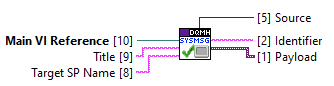
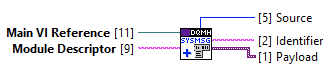
Add to Run-Time Menu
Sends the module's <b>Main VI Reference</b> and <b>Module Descriptor</b> to the UI Manager, which inserts the module into the relevant locations in the run-time menu.
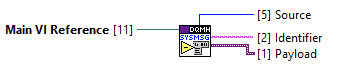
Remove from Run-Time Menu
Sends the module's <b>Main VI Reference</b>to the UI Manager, which removes the module from all locations in the run-time menu.
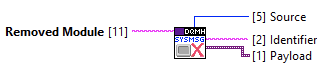
Removed from Subpanel
Sent from UI Manager's “Load Module into Subpanel” MHL case, lets the application know that a module has been removed from the subpanel it was shown in.
Startup Completed
Lets the UI Manager know that the startup phase of the whole application (ie anything that should happen before the splash screen is hidden and the front panel of UI Manager is shown) has completed.
UI Manager will send the “Startup Completed Received” broadcast, which notifies the startup.vi to wrap up startup phase.
Update Splash Screen Message
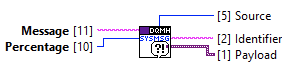
Updates the Splash Screen of the application with Message and Percentage during the startup phase (i.e. before the “System Message - Startup Completed” has been sent.
UI Manager will send the “Update Splash Screen Message Received” broadcast, which notifies the startup.vi to update the controls on the Splash Screen.
Note: Use percentages between 61% and 99%.
-


